A Syscall Journey in the Windows Kernel
The analysis on this post was made from a Windows 10 x64 bits. If you are trying to compare the content of this post on a lower Windows version you will be disappointed since changes were made in Windows 10.
In my last post dedicated to the different ways to retrieve Syscall ID, I explained quickly how direct syscalls were performed in User Mode and remained vague about how it was processed in Kernel Mode.
In this post, we will focus on how syscall numbers are processed in the Kernel and how the kernel routines related to the syscall numbers are retrieved and executed.
Previously in the User Mode
When a program needs to interact with other processes, memory, drives or the file system it uses the Windows API functions in Kernel32.dll. However, to interact with the Windows GUI, a program will use functions located in user32.dll and gdi32.dll.
Some of these functions can be seen as wrappers for direct syscalls to the Kernel. For instance, if you perform an OpenProcess() the execution will be:
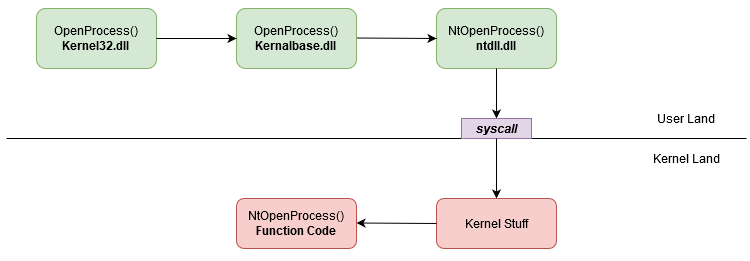
OpenProcess direct syscall
If you perform a SetMenu() the execution will be:
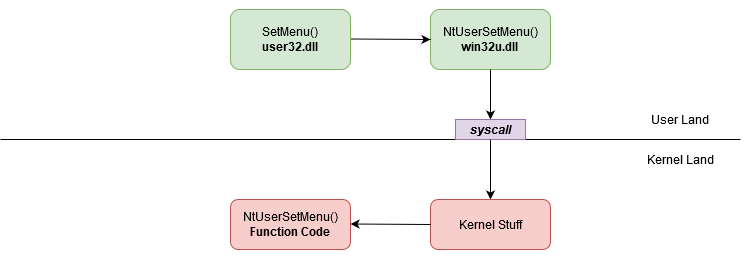
OpenProcess direct syscall
Finally, if you perform a GetRandomRgn() the execution will be:
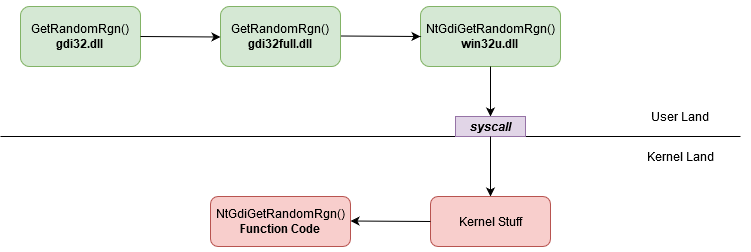
OpenProcess direct syscall
In the native windows execution flow, direct syscalls are performed via Nt* and Zw* functions that can be found in ntdll.dll or by NtUser* and NtGdi* functions that can be found in win32u.dll.
Small warning here, not all the Kernel32, user32 and gdi32 functions end up in direct syscall.
The “real” code of Nt*, Zw*, NtUser* and NtGdi* function runs in Kernel Mode.
In this post, Nt* and Zw* functions will be called Native functions. NtUser* and NtGdi* functions will be called GUI functions.
A direct syscall looks like this:

OpenProcess direct syscall
The code of a direct syscall is also called syscall stub.
The purpose of the syscall stub is to forward the execution flow of the function to the related code in the Kernel (the kernel routine). It’s the last step in User Mode. This transfer of execution is done by the assembly instruction syscall.
The only difference between syscall stub is the number moved in EAX. This number is called syscall ID or syscall number or system service number (SSN).
It allows the Kernel to retrieve the function code related to this identifier. Syscall identifiers are unique on a system and linked to a single function. They can change between different OS versions or service packs.
Welcome My Son, Welcome To The Machine Kernel1
On a 64 bits system, When the syscall instruction is executed the address in the LSTAR register is put in the RIP register.
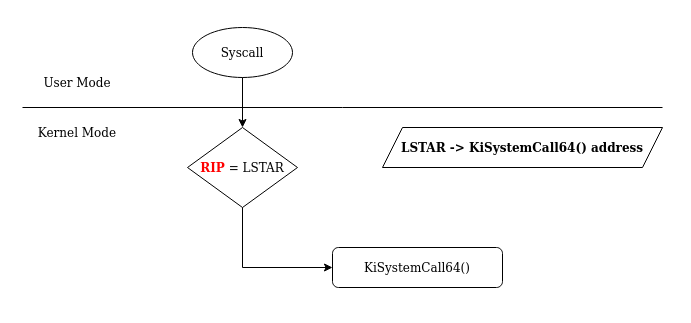
RIP is the register that store the next address to be executed in the workflow.
For the LSTAR register, it’s only purpose is to store the address of the first function executed in Kernel-Mode after a syscall instruction. The LSTAR register is one of many others registers called MSR (Model Specific Registers).
The value of the LSTAR register is set at the boot time.
We can see the value in LSTAR by using Windbg in Kernel Debug mode. In the system, LSTAR is identified as msr[c0000082].
To read his value, we use the command rdmsr (read MSR).
lkd> rdmsr c0000082 //
msr[c0000082] = fffff807`403ca140
lkd> ln  fffff807`403ca140

(fffff807`403ca140)   nt!KiSystemCall64Shadow   |  (fffff807`403ca16d)   nt!KiSystemCall64ShadowCommon
After the execution of the syscall instruction in User Mode, we switch into the Kernel Mode.
From here to the execution of the related kernel routine, the following functions will be executed (pretty much in this order) :
KiSystemCall64ShadoworKiSystemCall64(if the Meltdown mitigation is not activated);KiSystemServiceUser;KiSystemServiceStart;KiSystemServiceRepeat;KiSystemServiceGdiTebAccess;KiSystemServiceCopyStart(not executed all the time);KiSystemServiceCopyEnd.
In this post we will only focus on KiSystemServiceUser, KiSystemServiceStart, KiSystemServiceRepeatand
KiSystemServiceCopyEnd functions. We will also focus on specific Kernel structures used during the syscall number processing.
Retrieving the Kernel Thread with KiSystemServiceUser()
After the execution of the first function of the workflow (KiSystemCall64), KiSystemServiceUser() is the next one.
One of the important things happening in this function is the retrieval of the KTHREAD structure address of the current thread.
To do so, the instruction mov rbx, gs:188h is used.

get KThread
But what is this instruction? In the kernel of x64 bits systems, gs:0 contains a pointer to the _KPCR structure. KPCR stands for Kernel Processor Control Region.
lkd> dt nt!_KPCR
   +0x000 NtTib            : _NT_TIB
   +0x000 GdtBase          : Ptr64 _KGDTENTRY64
   +0x008 TssBase          : Ptr64 _KTSS64
   +0x010 UserRsp          : Uint8B
   +0x018 Self             : Ptr64 _KPCR
   +0x020 CurrentPrcb      : Ptr64 _KPRCB
   +0x028 LockArray        : Ptr64 _KSPIN_LOCK_QUEUE
   +0x030 Used_Self        : Ptr64 Void
   +0x038 IdtBase          : Ptr64 _KIDTENTRY64
   +0x040 Unused           : [2] Uint8B
   +0x050 Irql             : UChar
   +0x051 SecondLevelCacheAssociativity : UChar
   +0x052 ObsoleteNumber   : UChar
   +0x053 Fill0            : UChar
   +0x054 Unused0          : [3] Uint4B
   +0x060 MajorVersion     : Uint2B
   +0x062 MinorVersion     : Uint2B
   +0x064 StallScaleFactor : Uint4B
   +0x068 Unused1          : [3] Ptr64 Void
   +0x080 KernelReserved   : [15] Uint4B
   +0x0bc SecondLevelCacheSize : Uint4B
   +0x0c0 HalReserved      : [16] Uint4B
   +0x100 Unused2          : Uint4B
   +0x108 KdVersionBlock   : Ptr64 Void
   +0x110 Unused3          : Ptr64 Void
   +0x118 PcrAlign1        : [24] Uint4B
   +0x180 Prcb             : _KPRCB
The _KPCR structure is used to store processor specific data. At the end of the structure (offset 0x180h), we can see another structure called _KPRCB (Kernel Processor Control Block).
Like _KPCR, this structure contains processor specific data but it also contains pointers to the current, next and idle thread schedule for execution.
The target offset was gs:188h. So, if the end of _KPCR is at 180h, our value is at the offset 0x008h of _KPRCB.
lkd> dt nt!_KPRCB
   +0x000 MxCsr            : Uint4B
   +0x004 LegacyNumber     : UChar
   +0x005 ReservedMustBeZero : UChar
   +0x006 InterruptRequest : UChar
   +0x007 IdleHalt         : UChar
   +0x008 CurrentThread    : Ptr64 _KTHREAD
   +0x010 NextThread       : Ptr64 _KTHREAD
   +0x018 IdleThread       : Ptr64 _KTHREAD
   ....
the value at 0x008h is a pointer to the _KTHREAD structure of the current thread!
So by getting the value in gs:188h, we can indeed retrieve the KTHREAD address of the current thread.
The KTHREAD structure contains a lots of crucial informations needed by the Kernel for thread execution/management. It can be viewed as the Kernel version of the TEB (Thread Environment Block). Fun fact, the address of the TEB is stored in the KTHREAD!
   lkd> dt nt!_KTHREAD
   +0x000 Header           : _DISPATCHER_HEADER
   +0x018 SListFaultAddress : Ptr64 Void
   ....
   +0x080 SystemCallNumber : Uint4B
   +0x084 ReadyTime        : Uint4B
   +0x088 FirstArgument    : Ptr64 Void
   ....
   +0x0f0 Teb              : Ptr64 Void
   ....
At the end of KiSystemServiceUser(), two values are initialized in the KTHREAD structure.

Set SystemCall number and address of the first argument
We know by now that rbx stores the KTHREAD address of the current thread.
If we check the related offsets, we can see that 0x080 is the SystemCallNumber field and 0x088 is the FirstArgument field (cf. KTHREAD structure above).
The secrets of the Syscall Number and KiSystemServiceStart()
The System Call Number or System Service Number contains more information that it seems.
Actually, it contains 2 informations. The Table Identifier and the System Call Index.
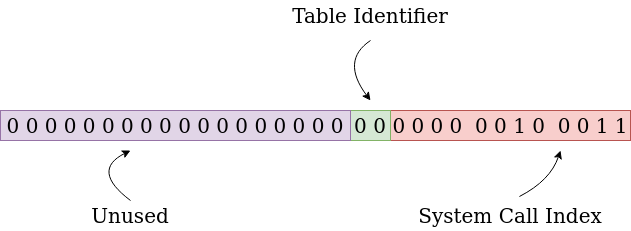
Informations in the Syscall Number 23h (NtQueryVirtualMemory)
In the first 12 bits [0 to 11] of this numbers (to read from the right to the left), it’s where the System Call Index is stored. In the bits 12 to 13 the Table Identifier is stored. The rest of the bits are unused.
Even if theoretically, the 2 bits dedicated to the Table Identifier can generate 4 values, today (in Windows 10 and 11) the values on the Table Identifier can only be 00 or 01.
The purpose of the function KiSystemServiceStart() is to extract these informations from the System Call Number.
Remember that our System Call Number is stored in the eax register.

Function NtQueryVirtualMemory()
Now, let’s take a look on what this function is actually doing.
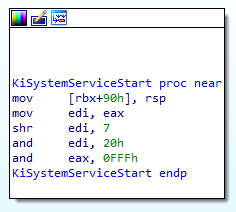
The function KiSystemServiceStart()
If we take as example the function NtQueryVirtualMemory(), the System Call Number associated is 23h
mov edi,eax     // edi = 23h = 0010 0011
shr edi, 7      // We shift edi 7 bits to the right
Shift 7 bits to the right
The value of edi is now 0000 0000 or 00h. Then, we extract the table identifier:
and edi, 20h // edi = 00h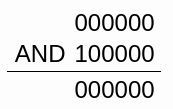
Extract table index
For NtQueryVirtualMemory() the Table Identifier is 00h.
Now we extract the System Call Index from eax
and eax, 0FFFh // eax = 23h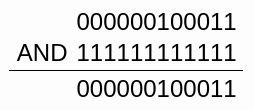
Extract SSN
The System Call Index for NtQueryVirtualMemory() is 23h.
So basically, nothing change except that we have now the Table Identifier in the edi register and the System Call Index in eax. Well, that’s kind of true.
But let’s take another example not from ntdll.

Function NtUserSetMenu()
For the function NtUserSetMenu() of win32u.dll the System Call Number is 1496h.
mov edi, eax    // edi = 1496h = 0001 0100 1001 0110
shr edi, 7      // Shift bits to the right
Shift 7 bits to the right
The value of edi is now 0000 0000 0010 1001 or 29h. Then, we extract the table identifier:
and edi, 20h // edi = 29h
Extract table index
For NtUserSetMenu() the table identifier is 20h.
Now we extract the System Call Index from eax
and eax, 0FFFh // eax = 1496h
Extract SSN
The System Call Index for NtUserSetMenu() is 496h.
Today in Windows 10 and 11, the initial value on the Table Identifier can only lead to the results 20h or 00h. This can be predicted just by looking at the Syscall Number.
If the number is between1000h and 1FFFh the Table Identifier will be 20h. This format of Syscall Number can be found on win32u.dll. These functions are related to the Windows GUI.
If the Syscall Number is between 0h and FFFh the Table Identifier will be 00h. This format of Syscall Number can be found on ntdll.dll. These functions are related to Native functions.
We will see in detail in the next chapter why the Table Identifier value is important.
Check and find with KiSystemServiceRepeat()
Friendly warning, this section is quite complex. I suggest you read it completely once to grasp the general idea and then read it a second time to pay attention to the detail.
The KiSystemServiceRepeat() function is the heart of the System call processing in the kernel.
It’s purpose is to:
- check if the syscall is related to a GUI function;
- choose the right
System Descriptor Table; - retrieve the address of the kernel routine related to the
System Call Index.
Let’s start the analysis of this function!
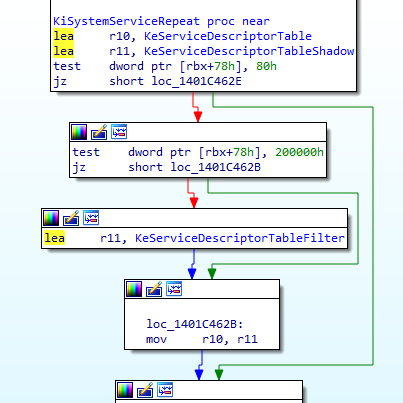
We can see that the address of 2 structures are loaded in r10 and r11. These structures named KeServiceDescriptorTable and KeServiceDescriptorTableShadow are generally called Service Descriptor Table (SDT).
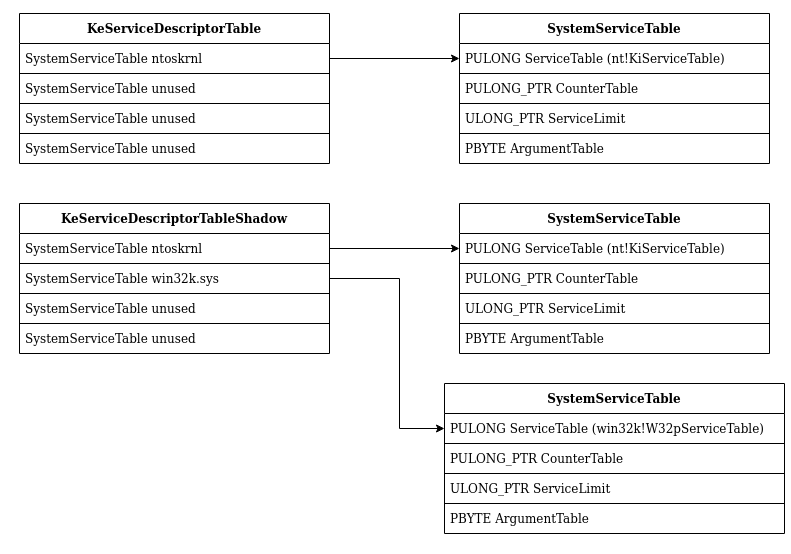
Service Descriptor Table always contains 4 SYSTEM_SERVICE_TABLE structure.
typedef struct tag_SERVICE_DESCRIPTOR_TABLE {
    SYSTEM_SERVICE_TABLE item1;
    SYSTEM_SERVICE_TABLE item2;
    SYSTEM_SERVICE_TABLE item3;
    SYSTEM_SERVICE_TABLE item4;
} SERVICE_DESCRIPTOR_TABLE;
And a SYSTEM_SERVICE_TABLE contains 4 elements:
typedef struct tag_SYSTEM_SERVICE_TABLE {
    PULONG      ServiceTable;
    PULONG_PTR  CounterTable;
    ULONG_PTR   ServiceLimit;
    PBYTE       ArgumentTable;
} SYSTEM_SERVICE_TABLE;
In this function the elements ServiceTable and ServiceLimit of the SYSTEM_SERVICE_TABLE will be used.
00 Synthesis break
- We have two
Service Descriptor TablenamedKeServiceDescriptorTableandKeServiceDescriptorTableShadow- The
Service Descriptor Tablecontains 4SYSTEM_SERVICE_TABLESYSTEM_SERVICE_TABLEare composed by 4 elements but for us onlyServiceTableandServiceLimitwill be useful.
In the Kernel memory the KeServiceDescriptorTable look like this:
lkd> dps nt!KeServiceDescriptorTable
fffff803`23e04880  fffff803`23ca8450 nt!KiServiceTable
fffff803`23e04888  00000000`00000000
fffff803`23e04890  00000000`000001cf
fffff803`23e04898  fffff803`23ca8b90 nt!KiArgumentTable
fffff803`23e048a0  00000000`00000000
fffff803`23e048a8  00000000`00000000
fffff803`23e048b0  00000000`00000000
fffff803`23e048b8  00000000`00000000
fffff803`23e048c0  fffff803`23bd7280 nt!KiBreakpointTrapShadow
fffff803`23e048c8  fffff803`23bd7300 nt!KiOverflowTrapShadow
fffff803`23e048d0  fffff803`23bd7d00 nt!KiRaiseSecurityCheckFailureShadow
fffff803`23e048d8  fffff803`23bd7d80 nt!KiRaiseAssertionShadow
fffff803`23e048e0  fffff803`23bd7e00 nt!KiDebugServiceTrapShadow
fffff803`23e048e8  fffff803`23bd9140 nt!KiSystemCall64Shadow
fffff803`23e048f0  fffff803`23bd8e00 nt!KiSystemCall32Shadow
fffff803`23e048f8  00000000`00000000
And KeServiceDescriptorTableShadow look like this:
lkd> dps nt!KeServiceDescriptorTableShadow
fffff803`23ded980  fffff803`23ca8450 nt!KiServiceTable
fffff803`23ded988  00000000`00000000
fffff803`23ded990  00000000`000001cf
fffff803`23ded998  fffff803`23ca8b90 nt!KiArgumentTable
fffff803`23ded9a0  fffff1d5`938cb000 win32k!W32pServiceTable
fffff803`23ded9a8  00000000`00000000
fffff803`23ded9b0  00000000`000004da
fffff803`23ded9b8  fffff1d5`938cc84c win32k!W32pArgumentTable
fffff803`23ded9c0  00000000`00111311
fffff803`23ded9c8  00000000`00000000
fffff803`23ded9d0  ffffffff`80000018
fffff803`23ded9d8  00000000`00000000
fffff803`23ded9e0  00000000`00000000
fffff803`23ded9e8  00000000`00000000
fffff803`23ded9f0  00000000`00000000
fffff803`23ded9f8  00000000`00000000
The following figure is a graphic representation of the 2 Service Descriptor Table
After the initialization of r10 and r11 with SDTs, we can see that a test is performed with the instruction:
test dword ptr [rbx+78h], 80hEarlier we saw that rbx contains the KTHREAD of the current thread. If we check at the offset 78h of the KTHREAD structure we find this :
   +0x078 UserIdealProcessorFixed : Pos 0, 1 Bit
   +0x078 ThreadFlagsSpare : Pos 1, 1 Bit
   +0x078 AutoAlignment    : Pos 2, 1 Bit
   +0x078 DisableBoost     : Pos 3, 1 Bit
   +0x078 AlertedByThreadId : Pos 4, 1 Bit
   +0x078 QuantumDonation  : Pos 5, 1 Bit
   +0x078 EnableStackSwap  : Pos 6, 1 Bit
   +0x078 GuiThread        : Pos 7, 1 Bit
   +0x078 DisableQuantum   : Pos 8, 1 Bit
   +0x078 ChargeOnlySchedulingGroup : Pos 9, 1 Bit
   +0x078 DeferPreemption  : Pos 10, 1 Bit
   +0x078 QueueDeferPreemption : Pos 11, 1 Bit
   +0x078 ForceDeferSchedule : Pos 12, 1 Bit
   +0x078 SharedReadyQueueAffinity : Pos 13, 1 Bit
   +0x078 FreezeCount      : Pos 14, 1 Bit
   +0x078 TerminationApcRequest : Pos 15, 1 Bit
   +0x078 AutoBoostEntriesExhausted : Pos 16, 1 Bit
   +0x078 KernelStackResident : Pos 17, 1 Bit
   +0x078 TerminateRequestReason : Pos 18, 2 Bits
   +0x078 ProcessStackCountDecremented : Pos 20, 1 Bit
   +0x078 RestrictedGuiThread : Pos 21, 1 Bit
   +0x078 VpBackingThread  : Pos 22, 1 Bit
   +0x078 EtwStackTraceCrimsonApcDisabled : Pos 23, 1 Bit
   +0x078 EtwStackTraceApcInserted : Pos 24, 8 Bits
   +0x078 ThreadFlags      : Int4B
The purpose of this instruction is to check if the GuiThread flag is set. If the flag is set then following instruction will be executed.
test dword ptr [rbx+78h], 200000hIf the flag is not set then it jumps above all this part.
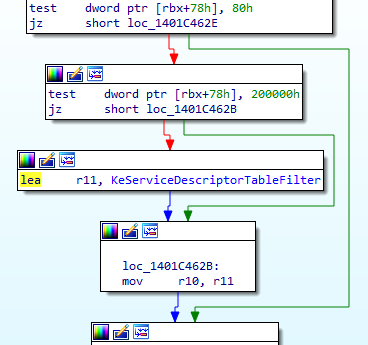
However, the first time that the thread will executes this routine the GuiThread flag is not be set. Why? Because the Kernel doesn’t know yet that if the current thread is processing a GUI function or not.
So for now the flag is not set and we are taking the jump to end up in this code:
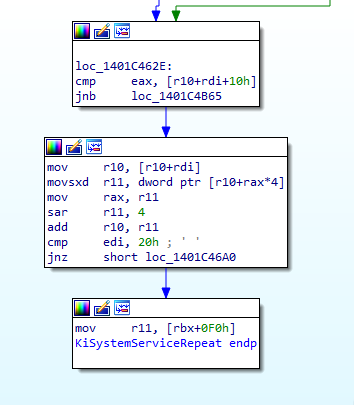
It’s checking if the value of eax is above the value at the address [r10+rdi+10h]
Let’s take a breath and use what we already know.
eaxcontains theSystem Call Indexextracted ealier inKiSystemServiceStart()rdicontains theTable Identifierextracted ealier inKiSystemServiceStart(). It’s value is20hor00hr10contains the address ofKeServiceDescriptorTable(it as been initialized at the beginning of this function)10hit just 16 in hexadecimal.
Ok so it looks like our System Call Index is compared with something in the KeServiceDescriptorTable.
If our syscall is related to a GUI function, we then have [KeServiceDescriptorTable+20h+10h] if not we have [KeServiceDescriptorTable+00h+10h].
Ok. Fine.
Let’s come back to what a Service Descriptor Table look like. A Service Descriptor Table contains 4 SYSTEM_SERVICE_TABLE structure and for KeServiceDescriptorTable in memory it look like this:
lkd> dps nt!KeServiceDescriptorTable
fffff803`23e04880  fffff803`23ca8450 nt!KiServiceTable
fffff803`23e04888  00000000`00000000
fffff803`23e04890  00000000`000001cf
fffff803`23e04898  fffff803`23ca8b90 nt!KiArgumentTable
fffff803`23e048a0  00000000`00000000
fffff803`23e048a8  00000000`00000000
fffff803`23e048b0  00000000`00000000
fffff803`23e048b8  00000000`00000000
fffff803`23e048c0  fffff803`23bd7280 nt!KiBreakpointTrapShadow
fffff803`23e048c8  fffff803`23bd7300 nt!KiOverflowTrapShadow
fffff803`23e048d0  fffff803`23bd7d00 nt!KiRaiseSecurityCheckFailureShadow
fffff803`23e048d8  fffff803`23bd7d80 nt!KiRaiseAssertionShadow
fffff803`23e048e0  fffff803`23bd7e00 nt!KiDebugServiceTrapShadow
fffff803`23e048e8  fffff803`23bd9140 nt!KiSystemCall64Shadow
fffff803`23e048f0  fffff803`23bd8e00 nt!KiSystemCall32Shadow
fffff803`23e048f8  00000000`00000000
So for a GUI function (Table Identifier at 20h) the formula is [KeServiceDescriptorTable+20h+10h] -> [23e04880+20h+10h] -> [23e048b0]. We can see that at this address the value is 0h.
lkd> dps nt!KeServiceDescriptorTable
fffff803`23e04880  fffff803`23ca8450 nt!KiServiceTable
fffff803`23e04888  00000000`00000000
fffff803`23e04890  00000000`000001cf
fffff803`23e04898  fffff803`23ca8b90 nt!KiArgumentTable
fffff803`23e048a0  00000000`00000000
fffff803`23e048a8  00000000`00000000
fffff803`23e048b0  00000000`00000000 <- [KeServiceDescriptorTable+20h+10h]
fffff803`23e048b8  00000000`00000000
....
However, if our syscall is a Native function the Table Identifier will be 00h and the formula [KeServiceDescriptorTable+00h+10h] -> [23e04880+00h+10h] -> [23e04890]. We can see that at this address the value is 1CFh.
lkd> dps nt!KeServiceDescriptorTable
fffff803`23e04880  fffff803`23ca8450 nt!KiServiceTable
fffff803`23e04888  00000000`00000000
fffff803`23e04890  00000000`000001cf <- [KeServiceDescriptorTable+00h+10h]
fffff803`23e04898  fffff803`23ca8b90 nt!KiArgumentTable
....
So basically the third item of the SYSTEM_SERVICE_TABLE is checked. This item is the ServiceLimit and it indicates the number elements in the ServiceTable.
typedef struct tag_SYSTEM_SERVICE_TABLE {
    PULONG      ServiceTable;
    PULONG_PTR  CounterTable;
    ULONG_PTR   ServiceLimit;
    PBYTE       ArgumentTable;
} SYSTEM_SERVICE_TABLE;
The ServiceTable item of the SYSTEM_SERVICE_TABLE is an array of relative value address (RVA). Each element of this array is linked to a kernel routine function.
So we have our System Call Index in eax checked against the number of RVA in the ServiceTable. What does it mean.
It checks if the System Call Index is valid (aka in the limit of the ServiceTable array) !
01 Synthesis break
- the
GuiThreadflag of the current thread KTHREAD structure is checked. However, Since it’s the first time we are executing this routine with this thread it’s set to 0.- the
System Call Indexis compared to the number of elements in theServiceTableof the firstSYSTEM_SERVICE_TABLEinKeServiceDescriptorTable.
But wait a minute ! If we have a GUI function like NtUserSetMenu(). Its Sytem Call Index is 496h! So the check will be 496h > 0h and our System Call Index will be considered invalid (aka the jump taken)!
Yes that’s true !
If we are in the case of NtQueryVirtualMemory(), then it’s not a GUI function. So in this case the check will be if 23h (the System call Index of the function) > 1CFh. Since 23h is below 1CFh the jump is not taken and the execution will continue in this function.
However, in the case of NtUserSetMenu(), 496h > 00h. So here the jump to loc_1401C4B65 will be taken.
For the exercise let’s imagine that we are in the case of NtUserSetMenu() and that it’s the first time that this thread is processing a GUI function.
In this case the jump to loc_1401C4B65 will take us here:
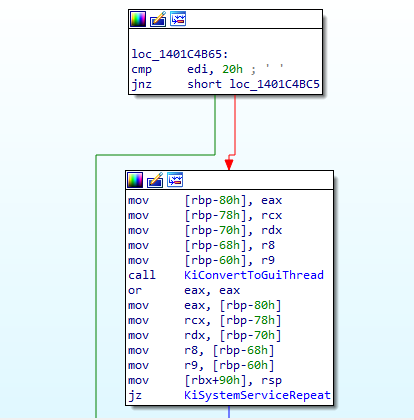
As we can see the first instruction is to check if edi is 20h. But by now we know what this means! It means that it’s a check to see if we are processing a GUI function.
We can see 2 others functions KiConvertGuiThread and KiSystemServiceRepeat.
So here it will be simple. If edi is indeed 20h it means that we are processing a GUI function and we need to convert our current thread in a GUI Thread via the function KiConvertGuiThread and then go back to KiSystemServiceRepeat.
But if edi is not 20h, it means that our syscall is not from a GUI function and that the System Call Index is out of range of the ServiceTable. So in this the last case, the routine it basically exiting the syscall processing workflow.
So if we are in the case of NtUserSetMenu(), our current thread is convert into a GUI Thread an we come back at the beginning of KiSystemServiceRepeat().
This time the GuiThread flag checked with test dword ptr [rbx+78h], 80h will be set, the jump taken and the following instruction executed
test dword ptr [rbx+78h], 200000hNow another flag in the KTHREAD of the current thread is checked. This time it’s the RestrictedGuiThread flag.
   +0x078 UserIdealProcessorFixed : Pos 0, 1 Bit
   +0x078 ThreadFlagsSpare : Pos 1, 1 Bit
   +0x078 AutoAlignment    : Pos 2, 1 Bit
   +0x078 DisableBoost     : Pos 3, 1 Bit
   +0x078 AlertedByThreadId : Pos 4, 1 Bit
   +0x078 QuantumDonation  : Pos 5, 1 Bit
   +0x078 EnableStackSwap  : Pos 6, 1 Bit
   +0x078 GuiThread        : Pos 7, 1 Bit
   +0x078 DisableQuantum   : Pos 8, 1 Bit
   +0x078 ChargeOnlySchedulingGroup : Pos 9, 1 Bit
   +0x078 DeferPreemption  : Pos 10, 1 Bit
   +0x078 QueueDeferPreemption : Pos 11, 1 Bit
   +0x078 ForceDeferSchedule : Pos 12, 1 Bit
   +0x078 SharedReadyQueueAffinity : Pos 13, 1 Bit
   +0x078 FreezeCount      : Pos 14, 1 Bit
   +0x078 TerminationApcRequest : Pos 15, 1 Bit
   +0x078 AutoBoostEntriesExhausted : Pos 16, 1 Bit
   +0x078 KernelStackResident : Pos 17, 1 Bit
   +0x078 TerminateRequestReason : Pos 18, 2 Bits
   +0x078 ProcessStackCountDecremented : Pos 20, 1 Bit
   +0x078 RestrictedGuiThread : Pos 21, 1 Bit
   +0x078 VpBackingThread  : Pos 22, 1 Bit
   +0x078 EtwStackTraceCrimsonApcDisabled : Pos 23, 1 Bit
   +0x078 EtwStackTraceApcInserted : Pos 24, 8 Bits
   +0x078 ThreadFlags      : Int4B
If this flag is set the value of r10 will be the address of KeServiceDescriptorTableFilter if not it will be KeServiceDescriptorTableShadow.
So from here it seems that for Native functions KeServiceDescriptorTable will be used and for GUI functions it will be KeServiceDescriptorTableFilter or KeServiceDescriptorTableShadow.
Before Windows 10 only two Service Descriptor Table existed. KeServiceDescriptorTable and KeServiceDescriptorTableShadow.
Since Windows 10 the KeServiceDescriptorTableFilter table was introduced.
Because GUI functions processed by the kernel are often targeted for exploit research, Microsoft decided to introduce this new table to reduce the attack surface. You can find information about it on a very interesting Google Project Zero blog post here
There is very few information about this table. Here’s what we can found about it in the book Windows Internals Part 1.
Filter Win32k System Call: This filters access to the Win32k kernel-mode subsystem driver only to certain API allowing simple GUI and Direct X access, mitigating many of the possible attacks, without completely disabling availability of the GUI/GDI Services.
This [filtering] is set through an internal process creation attribute flag, which can define one out of three possible sets of Win32k filters that are enabled. However, because the filter sets are hard-coded, this mitigation is reserved for Microsoft internal usage.
02 Synthesis break
- We followed the case of
NtUserSetMenu()executed by a thread that has never executed a GUI function before- Our thread has been converted into a GUI thread so the flag
GuiThreadis now set- According to the value of the flag
RestrictedGuiThreadthe value ofr10is nowKeServiceDescriptorTableFilterorKeServiceDescriptorTableShadowKeServiceDescriptorTableFilterwas introduced in Windows 10 and exist to reduce the attack surface on GUI functionsKeServiceDescriptorTableis used for Native functions
Now let’s take a look at the second part of this function
Last time we were here, we saw that if we were in the case of a GUI function the jmp to loc_1401C4B65 was taken.
But now we have taken this jump and the value of r10 is now the address of KeServiceDescriptorTableFilter or KeServiceDescriptorTableShadow.
To simplify, we will say that in this case, our process is not protected with Win32k filters so the KeServiceDescriptorTableShadow is used.
Lets take a look at KeServiceDescriptorTableShadow in memory again:
lkd> dps nt!KeServiceDescriptorTableShadow
fffff803`23ded980  fffff803`23ca8450 nt!KiServiceTable
fffff803`23ded988  00000000`00000000
fffff803`23ded990  00000000`000001cf
fffff803`23ded998  fffff803`23ca8b90 nt!KiArgumentTable
fffff803`23ded9a0  fffff1d5`938cb000 win32k!W32pServiceTable
fffff803`23ded9a8  00000000`00000000
fffff803`23ded9b0  00000000`000004da
fffff803`23ded9b8  fffff1d5`938cc84c win32k!W32pArgumentTable
fffff803`23ded9c0  00000000`00111311
fffff803`23ded9c8  00000000`00000000
fffff803`23ded9d0  ffffffff`80000018
fffff803`23ded9d8  00000000`00000000
fffff803`23ded9e0  00000000`00000000
fffff803`23ded9e8  00000000`00000000
fffff803`23ded9f0  00000000`00000000
fffff803`23ded9f8  00000000`00000000
So if we calculate our magic formula again -> [r10+rdi+10h] -> [KeServiceDescriptorTableShadow+20h+10h] -> [23ded980+20h+10h] -> [23ded9b0]. We can see that at this address the value is 4DAh.
lkd> dps nt!KeServiceDescriptorTableShadow
fffff803`23ded980  fffff803`23ca8450 nt!KiServiceTable
....
fffff803`23ded9a0  fffff1d5`938cb000 win32k!W32pServiceTable
fffff803`23ded9a8  00000000`00000000
fffff803`23ded9b0  00000000`000004da <- [KeServiceDescriptorTableShadow+20h+10h]
fffff803`23ded9b8  fffff1d5`938cc84c win32k!W32pArgumentTable
....
And now we are good to go! Because the System Call Index of NtUserSetMenu() is 496h and 496h < 4DAh the jump is not taken and we can follow the rest of the function workflow. We are in the range of the W32pServiceTable System Service Table.
mov     r10, [r10+rdi]
movsxd  r11, dword ptr [r10+rax*4]
mov     rax, r11
sar     r11, 4
add     r10, r11
cmp     edi, 20h ; ' '
Let’s take a new breathe.
So what we know:
r10is the address of ourSystem Descriptor Tablewhich in our case will beKeServiceDescriptorTableforNtQueryVirtualMemory()andKeServiceDescriptorTableShadowforNtUserSetMenu()rdiis theTable Identifier.00hforNtQueryVirtualMemory()and20hforNtUserSetMenu()raxis theSystem Call identifier.23hforNtQueryVirtualMemory()and496hforNtUserSetMenu()
So. Step by step.
mov     r10, [r10+rdi]

// For NtQueryVirtualMemory()   -> [KeServiceDescriptorTable+00h]
// For NtUserSetMenu()          -> [KeServiceDescriptorTableShadow+20h]
If we check in memory this values, we found that for NtQueryVirtualMemory() r10 will be the address of the KiServiceTable.
lkd> dps nt!KeServiceDescriptorTable
803`23e04880  fffff803`23ca8450 nt!KiServiceTable <- [KeServiceDescriptorTable+00h]
803`23e04888  00000000`00000000
803`23e04890  00000000`000001cf
803`23e04898  fffff803`23ca8b90 nt!KiArgumentTable
....
And for NtUserSetMenu(), r10 will be the address of W32pServiceTable.
lkd> dps nt!KeServiceDescriptorTableShadow
803`23ded980  fffff803`23ca8450 nt!KiServiceTable
803`23ded988  00000000`00000000
803`23ded990  00000000`000001cf
803`23ded998  fffff803`23ca8b90 nt!KiArgumentTable
803`23ded9a0  fffff1d5`938cb000 win32k!W32pServiceTable <- [KeServiceDescriptorTableShadow+20h]
803`23ded9a8  00000000`00000000
803`23ded9b0  00000000`000004da
803`23ded9b8  fffff1d5`938cc84c win32k!W32pArgumentTable
803`23ded9c0  00000000`00111311
....
The notation nt! means that the address is in the module ntoskrnl.exe. win32k! means that this address is located in the driver win32k.sys.
Here we can definitly see that GUI functions and Native functions are not at all in the same part of the kernel.
The next instruction then
movsxd  r11, dword ptr [r10+rax*4]

// For NtQueryVirtualMemory()   -> [nt!KiServiceTable + 23h*4h]
// For NtUserSetMenu()          -> [win32k!W32pServiceTable + 496h*4h]
Here in r11 will store a value from a Service Table. Service Table are also called System Service Dispatch Table (SSDT).
ASM Time
The
movsxdis amovthat allows to preserve the sign extension when a smaller register is copied into a 64-bit register. It is done by filling the extra bits with the sign extension.In a word if you are copying a negative number from a 32 bits register like ecx in a 64 bits register like rax the value will stay negative.
Remember when earlier we said that Service Table was an array of Relative Virtual Address related to kernel routine? Well it’s here that is happening.
rax is our System Call Index, and what is really useful to find stuff in array? And index! So here we are searching in the appropriate Service Table the RVA of our function.
For NtQueryVirtualMemory()
lkd> dd /c1 nt!KiServiceTable+4*0x23 L1
fffff803`23ca84dc  02953402
For NtUserSetMenu()
lkd> dd /c1 W32pServiceTable+4*0x496 L1
fffff1d5`938cc258  ff9a8ca0
And the multiplication by 4? Well, it’s just that in this array each item is 4 bytes long.
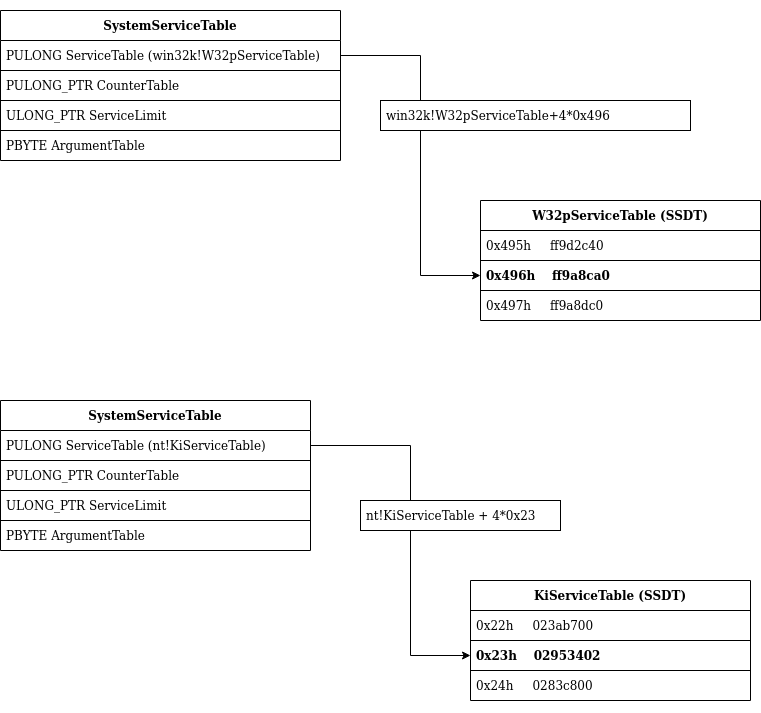
So let’s look at the next instructions.
mov     rax, r11
sar     r11, 4
It seems that we are saving our RVA in rax and we are performing on it (the RVA) an arithmetic shift of 4 bits to the right.
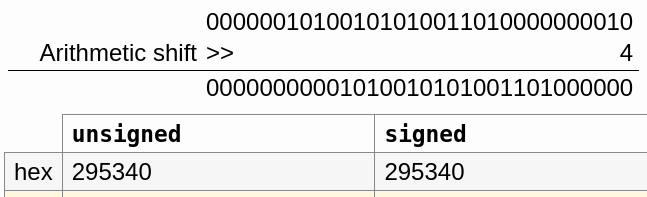
For the case of NtQueryVirtualMemory(), an arithmetic shift of 4 bits to the right on the RVA 02953402h will result in 295340h
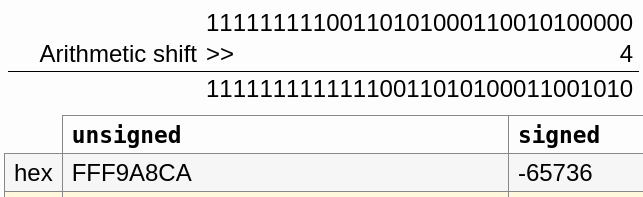
For the case of NtUserSetMenu() an arithmetic shif of 4 bits to the right on the RVA ff9a8ca0h will result in -65736
ASM Time
Arithmetic shift right (
sar) are often used for signed integers. Likemovsxdit allows to preserve the sign extension.For
ff9a8ca0hthe most significant bit (aka the last bit on the left) is set. So we are dealing with a negative number.
But why the RVA is shifted 4 bits to the right? It’s because the data retieved in the SSDT actually contains 2 things.
The 4 first bits is the number of parameters that are passed using the stack, the rest is our RVA. So by shifting 4 bits to the right, we are retrieving the real value of our RVA.
Below you can find the representation of the entry associated to Representation of NtQueryVirtualMemory() in the SSDT.
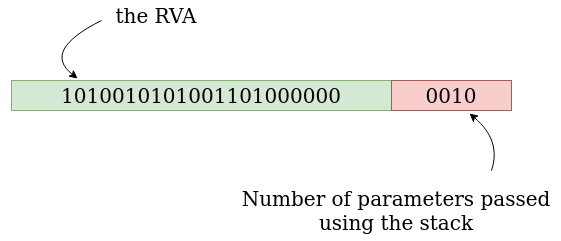
02953402.
And here the representation of the entry associated to Representation of NtUserSetMenu().
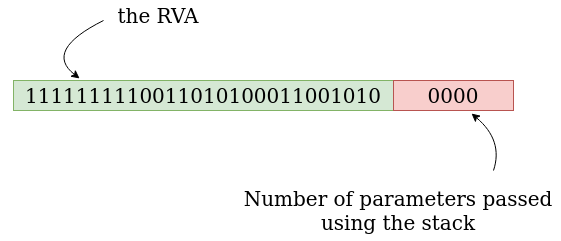
ff9a8ca0.
As we can see, the number of parameters passed using the stack is 2 for NtQueryVirtualMemory() and 0 for NtUserSetMenu().
Let’s see the prototype of this functions to check the number of parameters used by them.
For NtUserSetMenu():
NtUserSetMenu(
 HWND hWnd,
 HMENU hMenu,
 BOOL bRepaint);
For NtQueryVirtualMemory():
NtQueryVirtualMemory(
 HANDLE ProcessHandle,
 PVOID BaseAddress,
 MEMORY_INFORMATION_CLASS MemoryInformationClass,
 PVOID Buffer,
 ULONG Length,
 PULONG ResultLength);
But Wait a minute! For NtUserSetMenu() there is 3 parameters and for NtQueryVirtualMemory() there is 6!
Yes. But remember, I said “number of parameters passed using the stack”. What what does this mean?
Well, unlike in 32 bits where all the parameters of the function are passed using the stack. In Windows 64 bits systems, the first 4 parameters are passed using, in this order, the following registers:
RCX;RDX;R8;R9.
The rest of the parameters are passed using the stack.
And in our case? Well, NtUserSetMenu() is using 3 parameters, so they will be passed using the RCX, RDX and R8 registers. Here the stack will not be involved, hence the 0 parameters passed using the stack in ff9a8ca0.
NtQueryVirtualMemory() is using 6 parameters, the first 4 will be passed using the RCX, RDX,R8 and R9 registers. And the two last parameters will be passed using the stack, hence the 2 parameters passed using the stack in 02953402
03 Synthesis break
- We retrieved the address of the
System Service Dispatch Tableand stored it inr10- Using the
System Service Dispatch Tablearray we found theRVArelated to our functions by using ourSystem Call Index- We performed a arithmetic shift right of 4 bits on our
RVAto retrieve the “real value” of theRVAand remove the part with the number of parameters passed using the stack. Then we stored it inr11- The code uses instruction used for signed integer such as
movsxdandsar- For Native functions, we use a
System Service Dispatch Tablelocated inntoskrnl. For GUI functions, we use aSystem Service Dispatch Tablelocated in the driverwin32k.sys
Now we add our RVA to the address of our System Service Dispatch Table.
add r10, r11 // r10 = SSDT, r11 = RVALet’s take a look to what’s located at this address.
For the case of NtQueryVirtualMemory():
lkd> u nt!KiServiceTable + 00295340 L1
nt!NtQueryVirtualMemory:
fffff803`23f3d790 4883ec48        sub     rsp,48h
For the case of NtUserSetMenu():
lkd> u W32pServiceTable +  (-65736) L1
win32k!NtUserSetMenu:
fffff1d5`938658ca 48ff2587730500  jmp     qword ptr [win32k!_imp_NtUserSetMenu (fffff1d5`938bcc58)]
Hourra! It seems that we found the addresses of our functions in the kernel!!!
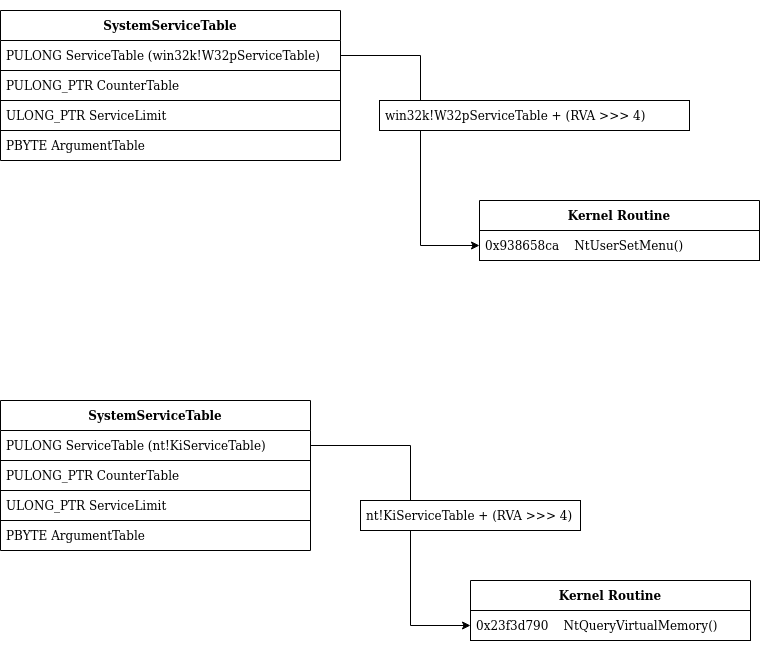
What about the Filter Table ?
Let’s check the function NtUserSetMenu() but this time in the KeServiceDescriptorTableFilter table.
lkd> dd /c1 win32k!W32pServiceTableFilter+4*0x496 L1
ffff9487`c926df88  ffd2b100

lkd> ? (ffd2b100>>>4)
Evaluate expression: 268249872 = 00000000`0ffd2b10

lkd> dd /c1 win32k!W32pServiceTableFilter+ffffffff`fffd2b10 L1
ffff9487`c923f840  48ec8348

lkd> u win32k!W32pServiceTableFilter+ffffffff`fffd2b10 L1
win32k!stub_UserSetMenu:
ffff9487`c923f840 4883ec48        sub     rsp,48h
The name of the function here is different. The function is called stub_UserSetMenu instead of NtUserSetMenu.
Why? We can find the answers in the book Windows Internals Part 2.
The only material difference between the Filter entries is that they point to system calls in Win32k.sys with names like stub_UserGetThreadState, while the real array [SSDT not filtered] points to NtUserGetThreadState. The former stubs will check if Win32k.sys filtering enabled for this system call, based, in part, on the filter set that’s been loaded for the process.
Based on this determination, they will either fail the call and return STATUS_INVALID_SYSTEM_SERVICE if the filter set prohibits it or end up calling the original function (such as NtUserGetThreadState), with potential telemetry if auditing is enabled.
The execution of the Kernel routine via KiSystemServiceCopyEnd()
The next functions executed after KiSystemServiceRepeat() are KiSystemServiceGdiTebAccess() and under certain condition KiSystemServiceCopyStart.
Then we end up here in KiSystemServiceCopyEnd(), the end of the road.

The interesting part for us is
mov   rax, r10
call  rax
In the previous chapter, we saw that the address of our Kernel routine was put in r10. Well as we can see it here, r10 is moved in rax and rax is executed.
So that’s it. The code of our functions in the Kernel is called here, in KiSystemServiceCopyEnd()!
Wrapping it up
In a nutshell, the workflow we learn in this post:
syscallinstruction: Performed in User-Mode. Put the address in theLSTARregister inRIPleading to the execution of the kernel functionKiSystemCall64[Shadow]()KiSystemServiceUser(): Retrieve theKTHREAD structureaddress of the current threadKiSystemServiceStart(): Extract theTable Identifierand theSystem call Indexfrom theSystem Call Numberstored ineax.KiSystemServiceRepeat(): The heart of the System call processing in the kernel. Check if the syscall is related to a GUI function, choose the rightSystem Descriptor Tableand finally retrieve the address of the kernel routine related to theSystem Call Indexby using theSystem Service Dispatch Table.KiSystemServiceCopyEnd(): Execute the Kernel routine.
Security Note:
At this point you may think “Ok, so I just have to make a malicious driver and place hooks on the
LSTARregister or in theSSDTto hijack the kernel workflow”. Well, there was a time when this was possible. Actually, it was a way for EDR or AV to perform analysis (like today with hooks in DLLs).However, it’s not possible anymore. To prevent this kind of change, Microsoft invented the
Kernel Patch Protection(KPP) also known asPatch Guard(PG). WithKPP, any attempt to patch theSSDTorLSTARwill lead to a aBSOD(blue screen of death).
I hope, you enjoyed this quick overview on how syscall are processed in the Kernel.
Thanks
Thanks to Aurélien Denis for the proofreading! And thanks to @am0nsec for reminding me the part about the number of arguments passed using the stack stored in the SSDT values.
Sources
- System Service Descriptor Table - SSDT
- The Quest for the SSDTs
- Windows Internals, Part 1, 7th Edition by Pavel Yosifovich, Mark E. Russinovich, Alex Ionescu, David A. Solomon
- Windows Internals, Part 2, 7th Edition by Andrea Allievi, Alex Ionescu, Mark E. Russinovich, David A. Solomon
- Practical Reverse Engineering: x86, x64, ARM, Windows Kernel, Reversing Tools, and Obfuscation by Bruce Dang, Alexandre Gazet, Elias Bachaalany, Sébastien Josse